
POE 1 · CLUSTER JEWELS
PoE Cluster Jewel crafting, step by step.
Pick a Cluster template, keep the notable combos you want, and test one jewel before you craft a full inventory. Here is how to set up the run in Exile's Foundry.
By Exile's Foundry · Updated
Before buying, use the Cluster base and item-level checklist. Track the cost of your batch with the free profit calculator.
1. Match the base to the template
Start with Small, Medium or Large Cluster Jewels, then choose the template for the base you plan to roll. Check the base type, passive count and item level before buying several jewels. A cheap base is not useful if it cannot roll the targets you selected.
Market Base Search opens PoE Trade with the template's base requirements. Check the selected league and current listings yourself before buying. The search helps find matching bases; it does not buy them for you.
Keep bases with different requirements separate. For the first test, use one jewel that matches the template rather than a mixed inventory.
2. Keep the notable combinations you want
A template can hold several acceptable results. Review the list before starting: a combo that was valuable in a previous league may not be one you want to keep now.
- Remove for this run: double-click a combo you do not want. Reopening the template restores its saved list.
- Keep your edits: press Save after changing the list if you want the same targets next time.
- Accept several outcomes: leave every compatible combo you want. The run can stop on any accepted result, rather than chasing only one exact combination.
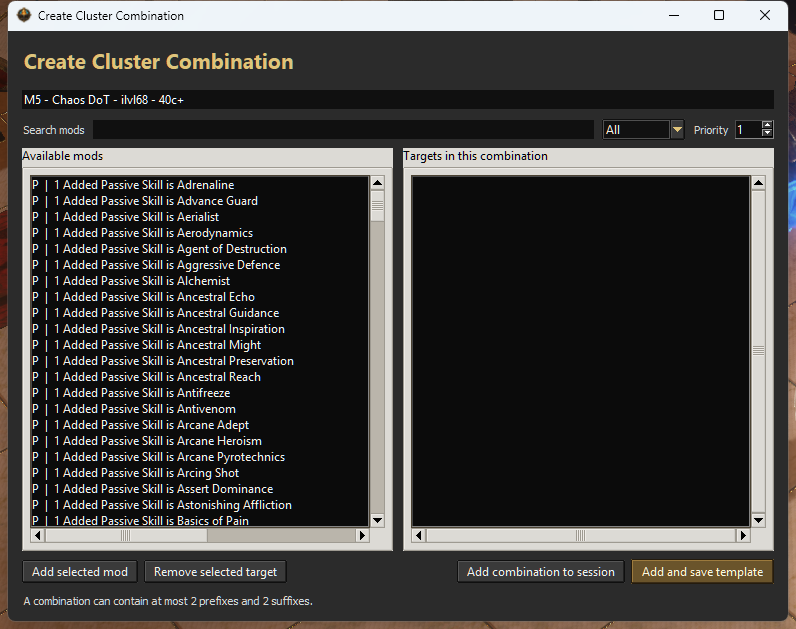
3. Build your own Cluster combo
- Select the Cluster size and base.
- Open + Combination and search the modifier pool.
- Add the notables or affix tiers that belong in the same result. Check the builder's prefix and suffix limits.
- Set its priority, then add the combo to this session or save it in a reusable template.
Check the complete combination before adding more targets. Similar-looking mod names can represent a different result; use the pool for the selected base instead of copying targets from another Cluster type.
4. Test one jewel before spending on a batch
Mark the item and currency slots requested by the selected workflow in Orb Locations. Make sure the currency is in those slots and the game is using English item text.
Press F4 to start the test. Watch the first rolls, confirm that the app reads the item and recognises the result you selected, and keep F5 ready to stop. If the app reads a different item or misses a target, stop and check the setup before continuing.
The calibration and stop-controls guide covers the controls used across crafting modes.
5. Chain Craft matching Cluster bases
After the single-jewel test works, place matching bases in the inventory and enable Chain Crafting. Set the first and last inventory slots so the app knows the range it should work through.
Check the accepted combos again before starting. Removing a combo changes what the run keeps; saving the template changes the list for later sessions too. Start with a small batch while you get used to the workflow.
For a complete example, watch the recorded 90-minute Cluster Craft session. It shows currency spent, valuable notable combos and a price check for each finished jewel. The recording does not include completed sales.
Before you craft at league start
- Choose the new league in trade searches and compare current listings.
- Check the base requirements and target pool after league changes.
- Review which notable combos you actually want to sell or use.
- Price the currency you will spend as well as the finished jewels.
- Retest locations and one complete craft after changing your setup.
A recorded result is useful for seeing the workflow. For your own run, use the current league's prices and demand instead of treating an older price check as today's sale value.
Cluster crafting questions
Does removing a combo change the saved template?
Removing it changes the current session. Press Save if you want the edited list to be used the next time you open the template.
Can I accept more than one notable combination?
Yes. Add several compatible combinations to the target list. Any accepted combination can count as a result.
Why will a base not roll my target?
Check that its Cluster size, base type and item level match the selected template. Also check that the desired modifiers can occur together in the chosen pool.
What should I do before Chain Craft?
Test one matching jewel, verify the item and currency locations, and set the first and last inventory slots before starting a batch.