
PATH OF EXILE 1 · WINDOWS
Set up your first craft in PoE 1.
Choose a base and the mods you want, mark the currency locations and check your setup on a single item before running a batch.
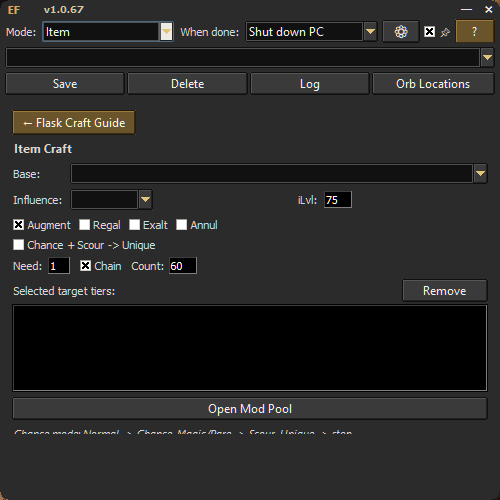
How it works
Choose the base and influence, add the mods and tiers you will accept, set how many targets must appear, and choose which currency the craft may use.
Press F4 to start. Press F5 at any time to stop immediately.
Crafting modes included
- Item Craft: select a base, influence, item level, currencies and exact natural modifier tiers.
- Cluster Craft: start from editable templates or create your own accepted notable combinations.
- Map Craft: enforce quantity and rarity thresholds while rejecting unwanted modifiers.
- Sockets and Colors: set socket, link and colour targets with explicit currency choices.
- Harvest and Eldritch: use their own target pools and calibrated workflow controls.
- Flask Craft Guide: review useful modifier pairs, minimum item levels and finishing advice.
This page covers PoE 1. See the PoE 2 features page for its crafting modes. Review the game's current rules before using third-party automation.
Your first craft
- Choose a mode and add the result you want.
- Mark the currency and item slots the mode needs.
- Test the setup on one item.
- Press F4 to start. Use F5 to stop.
Path of Exile crafting tool FAQ
What can the Path of Exile crafting tool automate?
It supports target-based workflows for items, Cluster Jewels, maps, sockets and colors, flasks, Harvest and Eldritch crafting in Path of Exile 1.
Does it support Path of Exile 2?
Yes. Exile's Foundry has a separate Path of Exile 2 tab on Windows 10 and 11, with its own crafting modes and currency locations.